Wondering how to upgrade from Optimizely CMS 12 to 13? Not sure where to start – you are not alone.
Here is a quick overview of the key architectural changes that need to be addressed.
Key Architecture Changes
- No Search and Navigation
- Opti-ID for Identity
- Graph for Search and Discovery
- Embedded DAM
- OCP for Integrations
- OPAL for AI
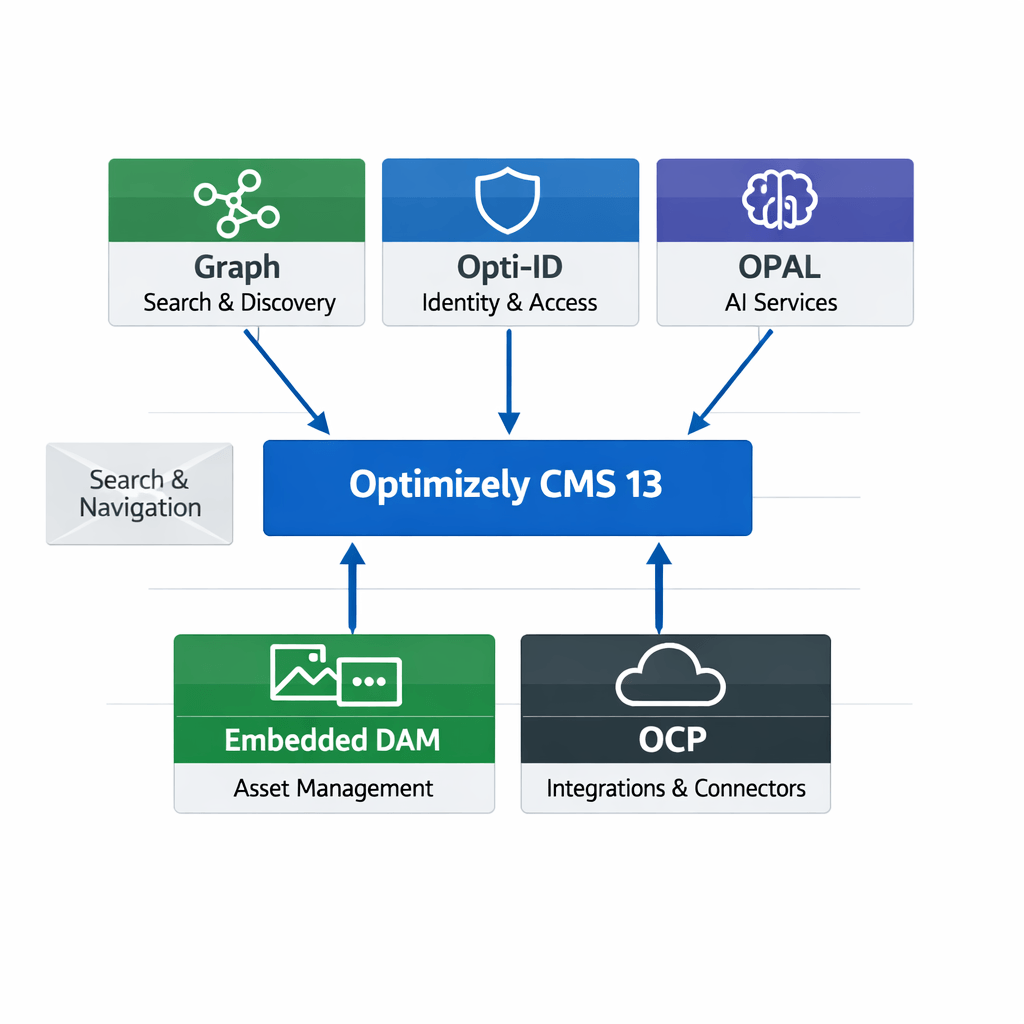
Optimizely CMS 13
🟩Graph — Search & Discovery
-
Provides unified content search across structured and unstructured data.
-
Enables semantic relationships between content items.
-
Powers personalized discovery experiences through relevance scoring and taxonomy mapping.
-
Integrates with Optimizely’s indexing layer for fast retrieval and filtering.
🟦Opti‑ID — Identity & Access
-
Centralized identity provider for user authentication and authorization.
-
Supports SSO, OAuth 2.0, and enterprise federation (e.g., Azure AD, Okta).
-
Manages user roles, permissions, and attribute mapping across CMS modules.
-
Ensures secure access control for editors, marketers, and external systems.
🟪OPAL — AI Services
-
Provides AI‑driven content recommendations and predictive analytics.
-
Automates tagging, summarization, and personalization workflows.
-
Integrates with external AI APIs for language and vision tasks.
-
Enhances editorial efficiency through intelligent suggestions and insights.
🟩Embedded DAM — Asset Management
-
Manages digital assets (images, videos, documents) directly within CMS.
-
Supports versioning, metadata tagging, and rights management.
-
Enables seamless asset reuse across pages and campaigns.
-
Connects to external storage or CDN for optimized delivery.
⬛OCP — Integrations & Connectors
-
Provides an integration framework for third‑party systems (CRM, ERP, marketing tools).
-
Uses REST APIs and webhooks for data synchronization.
-
Supports modular connectors for commerce, analytics, and automation.
-
Ensures scalable interoperability across enterprise ecosystems.
Hope this helps.
Happy Optimizing!


