While working on an Optimizely CMS 12 Opti ID integration recently, we ran into an issue that initially appeared to be related to SSO authentication but turned out to be an environment-specific configuration requirement.
The Problem
We needed to configure API key authentication for an Optimizely integration. However, when accessing the DXP Management Portal (PaaS Portal), the expected API key details were not visible.
At the same time, the team was investigating issues accessing the Admin Center and Support Portal through Opti ID SSO, which made it seem like the problems might be related.
What We Learned
After engaging Optimizely Support, the key piece of information was that:
The API for local configuration only works for the Integration environment. To view and use the API key configuration within the DXP Management Portal, Opti ID must first be enabled for the Integration CMS environment.[docs.devel…mizely.com]
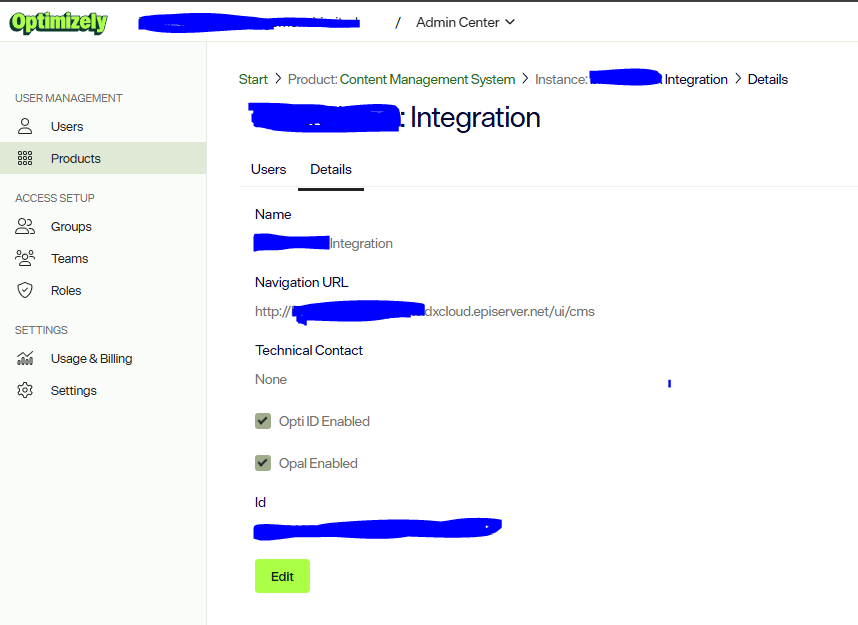
This was not immediately obvious and explained why the API key details were not appearing even though the environment was otherwise accessible.
Resolution
Once Opti ID was enabled for the Integration environment:
- The DXP Management Portal began displaying the API key details.
- We were able to retrieve the required credentials.
- The API key was configured in the application.
- Functional testing could proceed successfully.
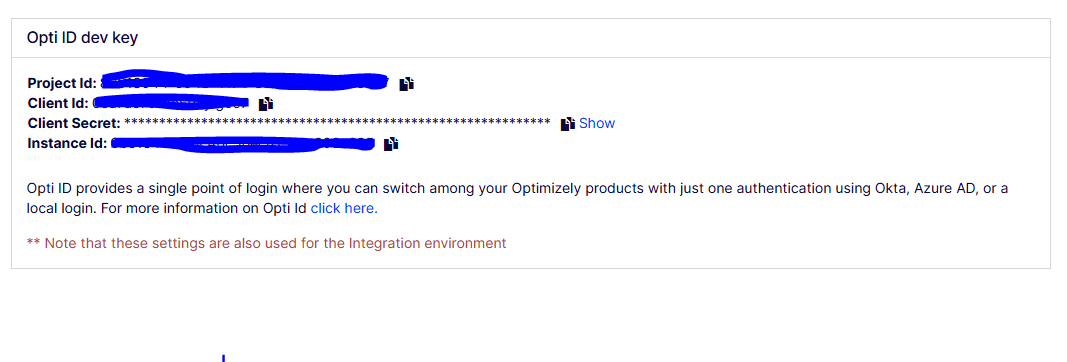
As confirmed during testing:
We have enabled Opti ID for the integration environment and the PaaS portal now shows the API key details. We configured the API key details in our code and started testing the functionality.
Key Takeaways
When working with Optimizely Opti ID integrations:
- Verify that Opti ID is enabled for the Integration CMS environment before attempting to retrieve API key details.
- If API keys are missing from the DXP Management Portal, check environment configuration first.
- Avoid assuming SSO authentication issues and API key visibility issues have the same root cause.
- Engage Optimizely Support early when certificate or authentication behavior appears inconsistent.
- Complete API key validation in Integration before promoting any configuration to higher environments.
Final Thoughts
A simple environment prerequisite prevented the API credentials from being displayed, and identifying that dependency quickly moved the team from investigation back into testing.
Happy Optimizing!


