
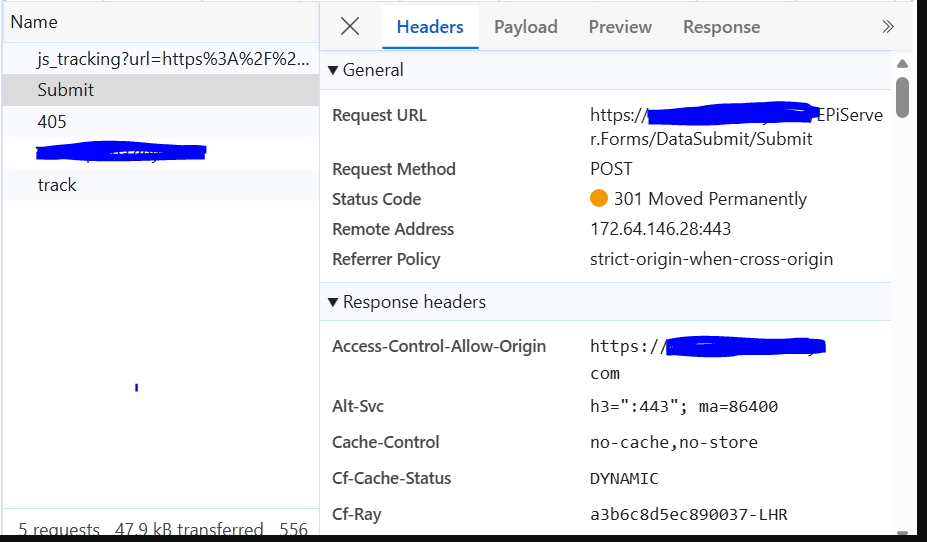
The Problem
As part of a security enhancement initiative, we introduced AntiForgery token support for custom forms within the solution.
The implementation included: AntiForgeryController.cs to generate and manage AntiForgery tokens for custom APIs and forms.
[Route("api/antiforgery")]
public class AntiForgeryController : ControllerBase
{
private readonly IAntiforgery _antiforgery;private readonly string _antiForgeryToken;
public AntiForgeryController(IAntiforgery antiforgery, IConfiguration configuration)
{
_antiforgery = antiforgery;_antiForgeryToken = configuration["AntiForgeryToken"];
}
[HttpGet("token")]
public IActionResult GetToken()
{
var tokens = _antiforgery.GetAndStoreTokens(HttpContext);
Response.Cookies.Append(
_antiForgeryToken,
tokens.RequestToken!,
new CookieOptions
{
HttpOnly = false,
Secure = true,
SameSite = SameSiteMode.Strict
});
return Ok(new
{
token = tokens.RequestToken
});
}}
Shortly after deployment, users reported that Optimizely Forms were no longer submitting successfully.
The behaviour was unusual:
- Form submissions failed intermittently.
- Browser Developer Tools showed a 301 response during form submission.
- Optimizely Forms that previously worked without issues could no longer be submitted.
- Removing the AntiForgery implementation immediately restored functionality.
This clearly indicated that the issue was related to the newly introduced security implementation.
Initial Investigation
Our first assumption was that the problem was related to:
- URL rewriting
- Redirect rules
- Front Door configuration
- Reverse proxy settings
- Form endpoint routing
However, none of these areas revealed any issues.
The turning point came when reviewing the application exception logs.
The logs contained the following error:
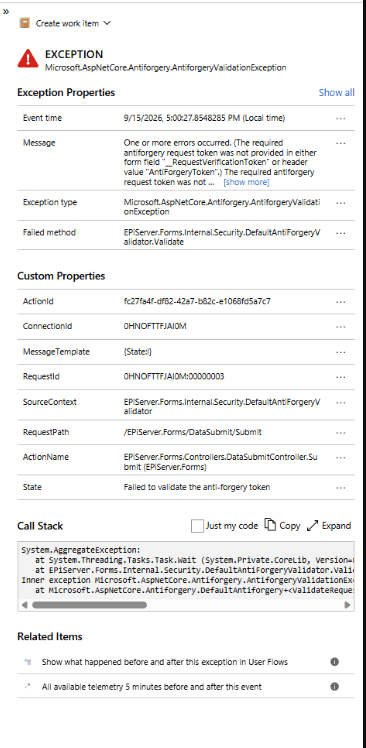
Understanding the Root Cause
Optimizely Forms already includes built-in AntiForgery protection.
When we introduced a custom AntiForgery implementation, we unintentionally created a conflict between:
Custom AntiForgery Token
Optimizely Forms AntiForgery Validation
The Optimizely Forms submission pipeline expected to receive a valid request verification token using its own validation mechanism.
Instead, the request validation process encountered a mismatch and failed with:
The Resolution
The fix was surprisingly simple.
We aligned the AntiForgery configuration so that Optimizely Forms could correctly locate and validate the expected request token.
Configuration update: appsettings.json
{“AntiForgeryToken”: “RequestVerificationToken”}
After correcting the AntiForgery configuration and validating the token flow:
- Optimizely Forms submissions started working again.
- No further 301 submission issues occurred.
- Standard Optimizely Forms security validation executed successfully.
- Custom forms continued to function as expected.
Happy Optimizing!


